Collapse And Expand With Code
Odin 3.0.1.0 introduced a new Property States system to properties, accessible through InspectorProperty.State, which manages certain states of properties such as Visible, Expanded and Enabled.
We can use it to programatically control the Collapsed/Expanded state of a foldout.
I'm going to show two examples, one is a bool that toggles the expanded state of a foldout group and the other is a an example showing how you would use it on a list that has folded elements inside of it.
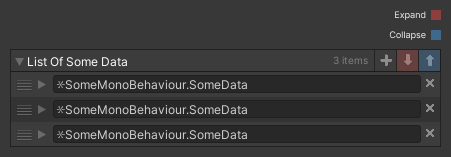
We're going to add two buttons to the list's title bar that collapse and expand all entries.
I'm also going to add the possibility to hold
Examples
Bool
1 2 3 4 5 6 7 8 9 10 11 12 13 | |
List Buttons
1 2 3 4 5 6 7 8 9 10 11 12 13 14 15 16 17 18 19 20 21 22 23 24 25 26 27 28 29 30 31 32 33 34 35 36 37 38 39 | |
1 2 3 4 5 6 7 8 9 10 11 12 13 14 | |
Odin concepts / API's used throughout the example
ActionResolvers
Used to resolve the "DrawExpandStateControls" string that's passed to the OnTitleBarGUI parameter into an executable action.
Attribute Expressions - @
Used inside the OnValueChanged attribute to set the expanded state of the bool example without writing a separate function.
EditorIcons
Used to have nice icons for our buttons.
FoldoutGroup
Used to draw a foldable group around our properties.
InspectorProperty
Used to access the property's state.
ListDrawerSettings
Used to add the buttons to the list's title bar.
NamedValues - $
Used to automagically pass the InspectorProperty argument into the DrawExpandStateControls function.
OnValueChanged
Used to get a callback whenever our bool changes its values so that we can change the property's state accordingly.
Property States
Used to access the property's state and set if it should be expanded or not.
Property Query Syntax - #
Used to retrieve the InspectorProperty representing the FoldoutGroup.
Recurse
Used to return an IEnumerable that recursively yields all children of the property, depth first.
SerializedMonoBehaviour
Used so that our test data will automatically have a foldout.
The serialization is not the important part here.
SirenixEditorGUI
Used to draw the title bar's buttons in the same style as the default add button.